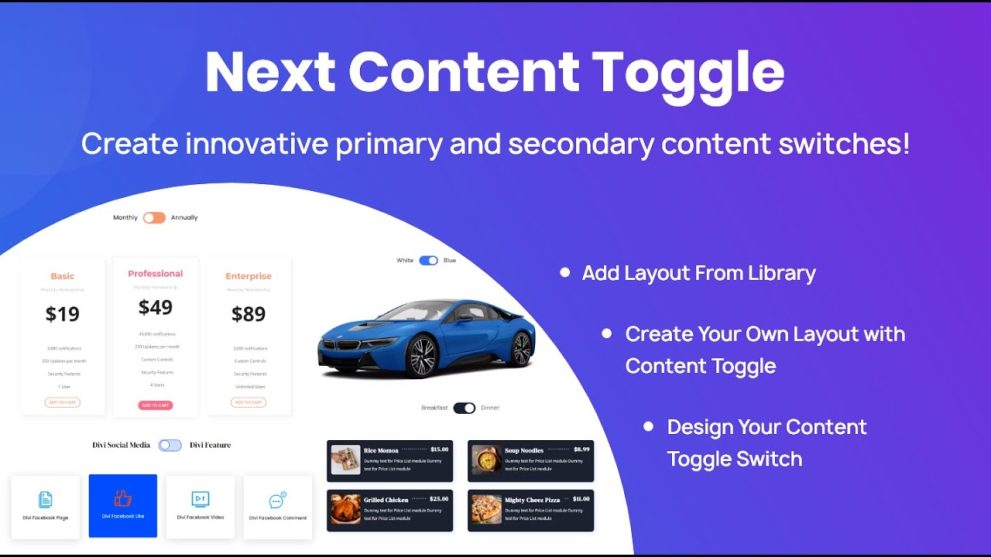

Next Content Toggle for Divi lets you create interactive toggle‑switch sections that reveal alternate content with a click — ideal for pricing tables, content comparisons, FAQs, and dual‑view layouts. Easily switch between two sets of content (text, layouts, images) without page reloads. It’s perfect for clean, user‑friendly pages with dynamic content display and seamless Divi integration.
This is EXACTLY the same product as distributed by the developer. Sales Page
Note: This Product is Activated. Use the License Key "B5E0B5F8DD8689E6ACA49DD6E6E1A930" to Activate.
Next Content Toggle — Introduction
Next Content Toggle enhances your WordPress site built with the Divi Builder by adding a flexible content-switching module. Instead of showing all content at once, this plugin allows you to present two separate content blocks and let users switch between them with a toggle button. This makes it easy to create cleaner layouts, interactive pricing tables, before/after comparisons, feature overviews, or alternate information panels — all within a single section.
The plugin does not require any coding. Visitors click a switch, and the content toggles smoothly. This improves user experience, reduces clutter, and makes the page visually appealing. Whether comparing pricing plans, showing product features, or presenting alternate content, Next Content Toggle provides a simple yet powerful solution for dynamic content display.
Key Features
- Interactive Content Switching: Display two content versions and let users toggle between them, ideal for comparisons or dual-view layouts.
- Supports Any Content Type: Toggle between text, images, saved layouts, or complex sections.
- Customizable Toggle Styles: Choose from various switch designs and adjust colors, sizes, and animations.
- Responsive Design: Works perfectly on desktops, tablets, and mobile devices.
- Smooth Animations: Fade, slide, or transition effects make the switch visually appealing.
- Lightweight & Optimized: Designed to be fast, avoiding performance issues or page slowdowns.
- Divi Builder Integration: Seamlessly adds a module in Divi Builder for easy visual configuration.
- Multiple Toggles Per Page: Use several toggle sections on the same page without conflicts.
- Versatile Use Cases: Pricing comparisons, product features, content variations, before/after displays, and more.
Getting Started
Install and activate Next Content Toggle on your WordPress site using Divi Builder. Open a page in Divi Builder and add a “Content Toggle” module. Configure the two content blocks you want users to switch between, including text, images, or layouts.
Customize the toggle switch style, size, color, and alignment. Enable smooth animations like fade or slide. Preview the toggle on desktop, tablet, and mobile to ensure responsiveness. Save or publish the page once satisfied. You can reuse toggle configurations across multiple pages or create several toggles on the same page.
Summary
Next Content Toggle is a user-friendly and efficient plugin that makes content presentation more dynamic and interactive. By allowing toggling between two content blocks, it reduces clutter and improves page readability. With support for any content type, customizable toggle styles, responsive design, and seamless Divi Builder integration, it is a versatile tool for pricing tables, product comparisons, content variations, and more. It helps create cleaner, more engaging websites without coding.
- Categories: WordPress Plugins
- Tags: Divi Next