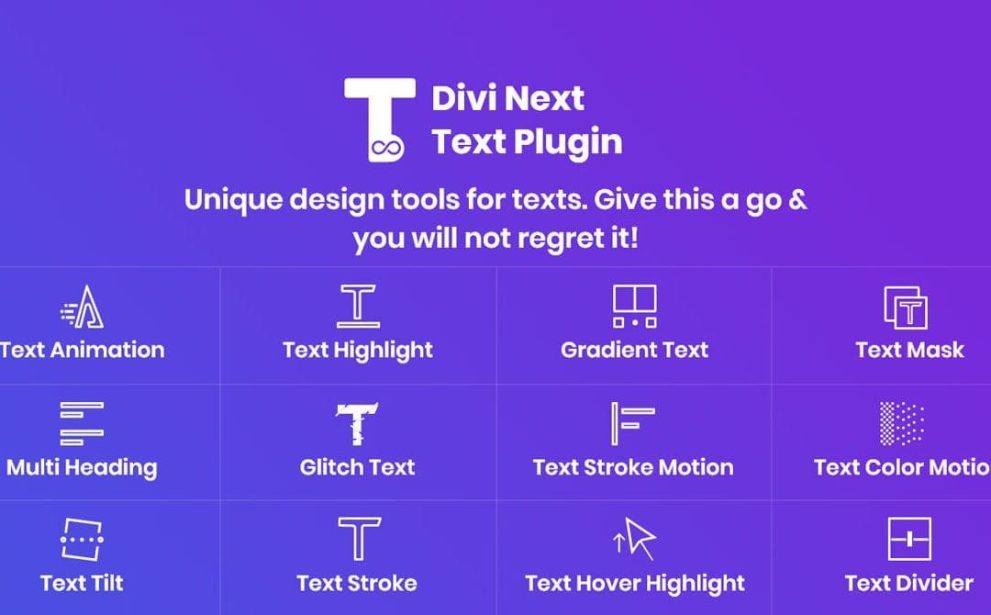

Divi Next Texts is a comprehensive typography plugin for the Divi Builder, offering more than a dozen advanced text‑modules — including animations, gradients, highlights, glitch effects, and multi‑heading layouts. It enables designers to create rich, visually dynamic text elements without coding. Perfect for headlines, callouts, or creative layouts that demand more than standard text styling.
This is EXACTLY the same product as distributed by the developer. Sales Page
Note: This Product is Activated. Use the License Key "B5E0B5F8DD8689E6ACA49DD6E6E1A930" to Activate.
Divi Next Texts — Introduction
Divi Next Texts expands the typography capabilities of Divi by introducing a versatile set of advanced text‑modules that go far beyond the default text block. Instead of relying on basic styling, you can design text elements with animations, gradients, highlights, glitch effects, multi‑part headings, masked text, and more — all from the comfort of the visual builder. Whether you’re crafting attractive headlines, animated intros, or stylistic callouts, this plugin gives you creative control to make your copy stand out and draw attention.
The plugin is ideal for marketers, creatives, agencies, or anyone looking to add personality and flair to their site’s typography. Because it integrates seamlessly into the Divi Builder interface and requires no code, even non‑developers can produce polished, dynamic text effects that previously might have required custom CSS or scripts. The result is a website with richer visual messaging and enhanced user engagement — all delivered through elegant, high‑impact typography.
Key Features
- 12+ Text Modules: Includes modules such as Text Animation, Gradient Text, Text Highlight, Text Mask, Multi‑Heading, Text Stroke / Stroke Motion, Glitch Text, Text Divider, Text Tilt, Text Color Motion, Hover‑Highlight, and more — furnishing a comprehensive typography toolkit.
- Text Animation Effects: Animate text with effects like slide, spiral, drop, clip, flip, typing, swirl, push — ideal for dynamic headings or attention‑grabbing intros.
- Text Highlight & Decorative Effects: Emphasize important words or phrases using underlines, zigzags, brush strokes, wave, strikethrough, and other highlight or decorative styles.
- Gradient & Color‑Motion Text: Apply vibrant gradients, animated color transitions, and color‑motion effects to text — perfect for headers, banners, or thematic sections.
- Glitch, Mask & Specialty Text Styles: Create glitch‑style text, masked text (text filled with images or patterns), and other creative typography effects to add personality and uniqueness.
- Multi‑Heading Layouts: Build complex headings composed of multiple parts — each part can have distinct styles, animations or interactions, giving fine‑grained control over typography hierarchy and presentation.
- Hover & Interactive Effects: Many modules support hover‑triggered animations and effects, enabling text to respond dynamically to user interaction.
- Responsive & Performance‑Friendly: Text modules adapt across devices — desktop, tablet, mobile — ensuring consistent readability and style while avoiding heavy performance overhead.
- No Coding Required: All styling, effects, and animations are managed through Divi Builder’s visual interface — no need for custom CSS or JavaScript.
- Unlimited Typography Designs: Combine effects, colors, and layouts to craft unlimited unique text styles for different pages, sections, or campaigns — ideal for branding and design flexibility.
Getting Started
After installing and activating Divi Next Texts on your WordPress site with Divi Builder, open any page or section in the Divi Visual Builder. You’ll see new text modules added to the module list under the “Insert Module” window. Choose the module type that suits your goal — for example, “Text Animation,” “Gradient Text,” or “Multi‑Heading.”
In the module settings, enter your text content, choose the desired effects or styles (animation type, gradient colors, highlight style, mask image, etc.), and customize typography, spacing, and layout to match your design. If the module supports hover or interactive animation, configure trigger settings. Then preview the result. Be sure to check how the effect renders on desktop, tablet, and mobile. Once satisfied, save or publish your page. You can replicate or reuse the styled text modules across the site for consistency and efficiency.
Summary
Divi Next Texts transforms ordinary text on Divi sites into expressive, animated, and visually compelling content. By offering a comprehensive suite of typography‑focused modules — from animated text and gradients to glitch effects, multi‑part headings, and hover interactions — it empowers users to craft stylish, high‑impact text without coding. The flexibility, responsiveness, and extensive customization make it a powerful choice for anyone wanting to elevate design aesthetics and user engagement through sophisticated typography.
- Categories: WordPress Plugins
- Tags: Divi Next