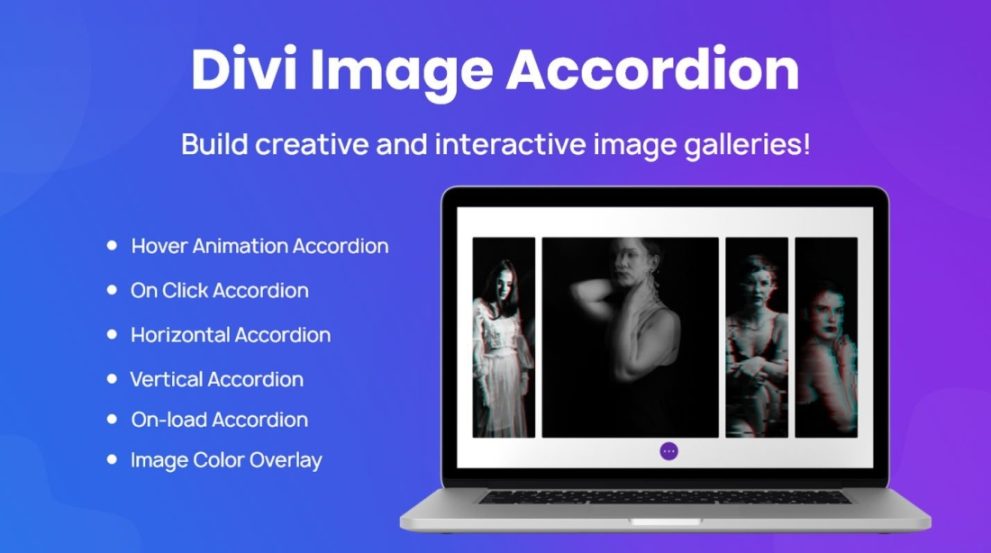

Divi Next Image Accordion lets you create interactive image galleries with hover‑ or click‑triggered accordion effects. Each image can reveal custom content such as icons, titles, descriptions or buttons — transforming static galleries into engaging, space‑saving visuals. Perfect for portfolios, team pages, product showcases or creative galleries built with Divi and WordPress.
This is EXACTLY the same product as distributed by the developer. Sales Page
Note: This Product is Activated. Use the License Key "B5E0B5F8DD8689E6ACA49DD6E6E1A930" to Activate.
Divi Next Image Accordion — Introduction
Divi Next Image Accordion is a premium module designed to turn ordinary image galleries into dynamic, interactive experiences within the Divi Builder. Instead of showing static images, this plugin lets you present a group of images as a cohesive accordion — where hovering over or clicking an image expands it and reveals associated content like icons, titles, captions, descriptions, or buttons. This effect creates visually appealing, interactive galleries that engage visitors and save space while showcasing multiple images or products elegantly.
This module is ideal for websites that require visually rich galleries — such as creative portfolios, team showcases, product displays, or service catalogs. By combining images with descriptive overlays and interactive animations, it helps deliver information in a compact yet attractive way. Because the module integrates directly into Divi Builder, you can configure everything visually without writing code, making it accessible to both designers and non‑technical users alike.
Key Features
- Hover or Click Trigger: Choose whether gallery items expand on hover or require a click to open — giving flexibility depending on the user experience you want.
- Multiple Items Support: Add as many images as needed in a single accordion module, each with its own content and settings, enabling large, content-rich galleries.
- Custom Content Per Image: For each image you can define title, subtitle or heading, description text, icon or separate image overlay, and optional call-to-action button or link — perfect for portfolios, team bios, or product details.
- Flexible Layout Direction: Display the accordion horizontally or vertically, depending on page layout and design requirements, making it easy to integrate into various designs or screen sizes.
- Animation & Transition Effects: Smooth animations for expanding items — including customizable reveal transitions — make the gallery feel dynamic and polished, enhancing user interaction.
- Overlay & Styling Options: Customize overlays, backgrounds, typography, spacing, hover effects, and image proportions so the gallery matches your site’s branding and design language perfectly.
- Responsive & Mobile‑Ready: Layouts adapt to desktop, tablet, and mobile screens so galleries look great and perform well across all devices.
- Built for Divi Builder: The module appears in your Divi module list and uses Divi’s visual builder interface — letting you design, preview, and tweak galleries as easily as any other Divi layout block.
- Space‑Saving & Clean Layouts: By consolidating many images into a single accordion gallery, you avoid overwhelming users with long image lists or heavy galleries — ideal for landing pages, portfolios, or product showcases.
Getting Started
To begin, install and activate Divi Next Image Accordion on your WordPress site running Divi Builder or Divi Theme. Once activated, open a page or section in the Divi Builder and locate the “Image Accordion” module in the module list. Add it to your layout where you want the gallery to appear.
Inside the module settings, start by adding new “items” — each item corresponds to one image in the gallery. For each item, upload or select an image from the media library, then define optional overlay content: icon or secondary image, title, description, and optionally a button with a custom link. Choose whether the accordion should react to hover or click under the accordion settings. Set the layout direction (horizontal or vertical), gallery height or item proportions, and spacing settings to fit your design.
Use the design tab to customize styling: overlay colors, typography, hover effects, animation speed, padding, and margins. After configuration, preview the gallery on desktop, tablet, and mobile modes to verify responsiveness and behavior. Once satisfied, save or publish the page — your interactive image accordion is now live and ready for visitors.
Because the module integrates into Divi visually, you can add, remove, or reorder items, adjust styling, or duplicate the module elsewhere at any time without touching code.
Summary
Divi Next Image Accordion transforms standard image galleries into sleek, interactive accordion‑style showcases that combine visuals with descriptive content elegantly. With hover or click-triggered expansion, custom overlays, flexible layouts, responsiveness, and deep styling options, it’s ideal for portfolios, product catalogs, team showcases, galleries, or any site section where you want to present multiple images in a refined, space-efficient way. Its seamless integration with Divi Builder makes it easy to use and customize for both beginners and experienced designers, offering a powerful tool to enhance user engagement and website aesthetics.
- Categories: WordPress Plugins
- Tags: Divi Next