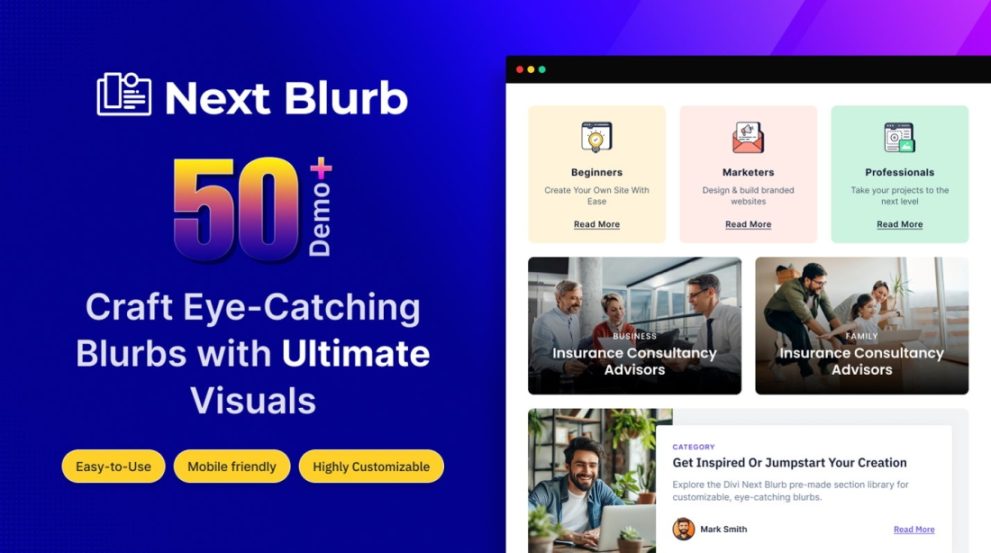

Divi Next Blurb is a versatile Divi Builder module that lets you craft stylish content blocks with icons, images, text and buttons in a single design. With advanced hover effects, 3D tilt, and full layout flexibility, this module helps you build visually engaging blurbs for services, features, testimonials or calls to action — all without writing any code and fully responsive across devices.
This is EXACTLY the same product as distributed by the developer. Sales Page
Note: This Product is Activated. Use the License Key "B5E0B5F8DD8689E6ACA49DD6E6E1A930" to Activate.
Divi Next Blurb — Introduction
Divi Next Blurb enhances your WordPress site built with Divi by giving you a powerful, multifunctional blurb module to create rich content blocks. Rather than being limited to simple titles and text, this module lets you combine icons, images, text, headings, and buttons — all in one cohesive design element. It’s ideal for presenting services, features, team bios, promotional content, or any section requiring attractive visual presentation and clear messaging.
The module is designed for both ease and creativity. Whether you are a novice building your first website or an experienced designer crafting a complex layout, Blurb offers flexible customization options to match your brand’s style. Its responsive design ensures blurbs look crisp on desktop, tablet, or mobile, and its visual builder integration means you never have to touch code to build professional-looking sections.
Key Features
- Icon & Image Support: Use icons or images — or combine both — inside a single blurb, giving you versatility in presentation style and visual storytelling.
- Flexible Layout & Placement: Position icon/image relative to text (left, right, top, custom) and control alignment, spacing, padding, and order for unique layouts.
- 3D Tilt & Hover Effects: Add interactive animations and hover effects (tilt, fade, slide, etc.) to engage visitors and make blurbs visually dynamic.
- Multiple Title Styles: Create blurbs with one or more headings plus supporting text, offering flexibility in hierarchy and design for different content types.
- Custom Styling Options: Control typography, colors, borders, shadows, background, and spacing — enabling full branding consistency and creative freedom.
- Button Integration: Include call-to-action buttons within blurbs to drive conversions — ideal for services, offers, or links to other pages.
- No Coding Required: Entirely configurable via the Divi visual builder interface — enabling anyone to build advanced layout blocks without CSS or HTML knowledge.
- Responsive & Performance Optimized: Layouts adapt to different device sizes and maintain performance even with advanced effects applied.
- Unlimited Design Possibilities: Combine elements in countless ways — icon + image, various hover styles, custom layouts — ideal for creativity and uniqueness.
Getting Started
Install and activate the plugin on your WordPress site using Divi Builder. Open a page or section in Divi Builder and add the “Blurb” module provided by Divi Next. In the module settings, choose whether to use an icon, an image, or both. Add your heading(s), description text, and optionally a button for calls to action.
Next, head to design options to customize layout: define icon/image placement (left, top, right, custom), adjust spacing, alignment, padding and margins. Configure hover or tilt effects under animation settings to make your blurb interactive. Style typography, colors, backgrounds, borders, and shadows to match your brand aesthetic.
Preview the blurb in desktop, tablet, and mobile modes to ensure responsiveness. If needed, tweak padding/spacing or disable heavy effects on mobile for better performance. Once satisfied with the design, save changes and publish your page. You can reuse the same module settings elsewhere or create multiple unique blurbs for different content sections.
Summary
Divi Next Blurb is a powerful yet user‑friendly module that transforms standard content blocks into dynamic, polished blurbs combining icons, images, text and buttons. Its wide range of layout options, hover and tilt effects, and deep customization capabilities make it an excellent choice for service showcases, features, portfolios, team sections, or call‑to‑action blocks. Responsive, code‑free, and design‑flexible — it’s a robust tool to elevate any Divi‑powered website’s visual appeal and usability.
- Categories: WordPress Plugins
- Tags: Divi Next