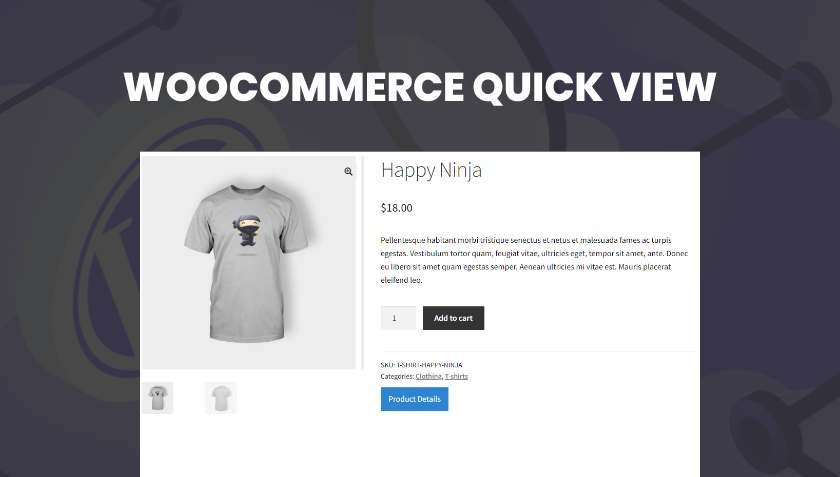

WooQuickCart is a streamlined add-on for WooCommerce that delivers a sleek “quick view” shopping experience—allowing customers to view product details and add items to the cart without leaving the current page. With configurable triggers (hover or button), customizable modal layouts and seamless integration, it helps reduce friction, accelerate purchasing and keep shoppers engaged across your online store.
This is EXACTLY the same product as distributed by the developer. Sales Page
What is WooQuickCart?
Most WooCommerce stores rely on standard product pages that navigate away from listings, which can interrupt the shopping flow. WooQuickCart introduces a modal overlay or pop-up “quick view” interface so customers can preview product details, select options and add to cart without page reloads or full navigation. This smoother experience helps maintain momentum, especially on category or archive pages.
Key Features
- Configurable modal trigger: choose between hover action or dedicated “Quick View” button.
- Customizable modal layout: adjust overlay style, slider or carousel of images, product info, add-to-cart button and navigation arrows.
- Full responsiveness: quick-view works smoothly on desktop and mobile devices for consistent user experience.
- Seamless WooCommerce compatibility: works with standard products including variations, ensuring streamlined add-to-cart action inside the modal.
- Lightweight and performance-aware: designed to load quickly and avoid impacting page speed or user experience.
- Flexible customization: control modal look (overlay opacity, close button, navigation arrows) and behavior in a unified settings panel.
Typical Use Cases
- A large product-catalog store wants to let users browse multiple items in archive pages quickly, preview details and add multiple items without leaving the listing page.
- A fashion or accessory store uses hover-trigger quick view so buyers can check product images and size options without navigating away from the grid.
- A multi-vendor or marketplace setup wants to enhance product discovery and reduce bounce by keeping users engaged in the listings rather than toggling pages.
- A mobile-first store ensures quick-view works on phones, enabling fast add-to-cart through a modal interface designed for smaller screens.
Setup & Workflow
- Install and activate WooQuickCart in your WooCommerce environment.
- Go to the plugin’s settings and choose your preferred trigger (hover or button).
- Configure modal layout options: overlay color/opacity, image slider or grid, controls style, navigation arrows, close button.
- Specify where quick-view should appear (archive listings, product grids, mobile or desktop only).
- Test on category and shop pages: hover or click to open the quick-view, verify product details, variation selection, and add-to-cart behavior inside the modal.
- Review mobile responsiveness: confirm modal displays, closes properly, and the add-to-cart works seamlessly on mobile devices.
- Monitor user behaviour post-implementation: track add-to-cart rate from quick-view, bounce rate on product grids, and adjust trigger or layout if necessary.
Benefits
- Improves user experience by reducing navigation steps—customers can explore products and add them without leaving the current page.
- Boosts conversion rate by maintaining flow and reducing drop-off when users investigate multiple items.
- Enables faster browsing of large catalogs—shoppers spend less time waiting for page loads and more time adding products.
- Aligns with mobile-first behaviour by offering a modal interface that adapts to smaller screens and minimal tap interactions.
- Enhances store design and UX sophistication with modern UI patterns (modals, sliders, overlays) without heavy custom coding.
- Categories: WordPress Plugins
- Tags: Astoundify