
The SupportCandy Timer add-on can calculate the time spent on a single ticket. This will help you record and track the time spent on each ticket. In addition, it can help you make productivity decisions for your brand.
This is EXACTLY the same product as distributed by the developer. Sales Page
THIS ITEM IS ACTIVATED
Core Features
-
Manual & Auto-Tracking: Agents can manually start, pause, and stop a timer within the ticket interface. It also includes an “Auto-start” setting that triggers the timer immediately when an agent opens a new ticket.
-
Parallel Tracking: Multiple agents can work on the same ticket and run their timers simultaneously; the system will log each agent’s contribution separately.
-
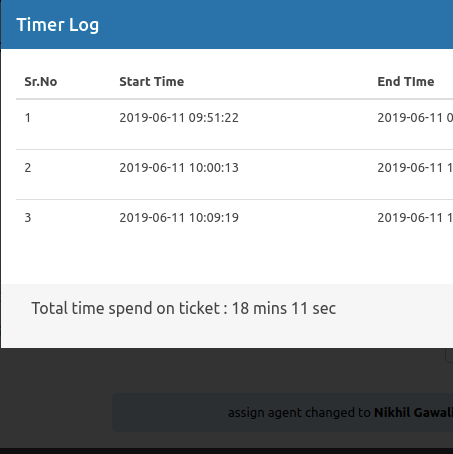
Time Logs: Maintains a detailed history of all time entries, including:
-
Author: Who logged the time.
-
Date Started: The specific timestamp for the entry.
-
Description: A short note explaining what was done during that interval.
-
-
Widget Integration: Adds a “Timer Widget” to the sidebar of the ticket page for quick access. This widget can also be made visible to customers (read-only) so they can see the total time spent on their request.
-
Automated Actions: You can configure the timer to automatically stop all active sessions when a ticket status is changed to “Closed.”
Reporting & Notifications
-
Email Macros: Includes specific macros (placeholders) like
[timer_logs]and[time_spent]that can be inserted into email notifications to keep customers or managers updated on billable hours. -
Ticket List Columns: Allows “Total Time Spent” to be added as a column in the main ticket list view for at-a-glance monitoring.
-
Role Permissions: Fine-grained control over who can view logs, start timers, or modify/delete existing logs (e.g., allowing Managers to edit an agent’s accidental 8-hour log).
Technical Requirements
-
Core Plugin: Requires the base SupportCandy plugin (v3.0 or higher recommended) to be installed and active.
-
Format: Time is generally logged and displayed in a
XXd XXh XXmformat. -
License: Typically sold as part of a SupportCandy bundle (Standard, Agency, or Pro plans) rather than a standalone purchase.
- Categories: WordPress Plugins
- Tags: SupportCandy