
Statistics and reports are an integral part of any business. The SupportCandy Reports add-on can give you a quick overview of the performance of your business on the timeline.
This is EXACTLY the same product as distributed by the developer. Sales Page
THIS ITEM IS ACTIVATED
1. Key Performance Metrics (Core Reports)
The extension automatically generates several types of reports to help you identify bottlenecks:
-
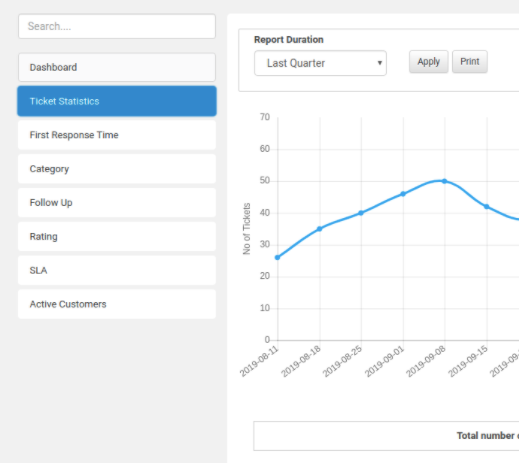
Ticket Statistics: Tracks the total volume of tickets created versus tickets closed over a specific timeline.
-
Response Delay: * First Response Delay: Measures how long it takes for an agent to first acknowledge a ticket.
-
Average Response Delay: Measures the overall speed of communication.
-
-
Ticket Closing Delay: Tracks the average duration from ticket creation to final resolution.
-
Communication Gap: Analyzes the average number of threads (replies) exchanged before a ticket is closed, helping you spot inefficient workflows.
-
Customer Satisfaction (CSAT): Integrated with the Satisfaction Survey add-on to report on agent ratings and feedback.
2. Custom Field Reporting
Unlike basic reporting tools, SupportCandy allows you to generate reports based on Custom Fields. You can visualize data specifically for:
-
Categories: Which department or topic gets the most tickets?
-
Priorities: What is the distribution of “Urgent” vs. “Low” priority tasks?
-
Dropdown/Radio Fields: Any custom data points you’ve added to your ticket forms can be plotted.
3. Filtering and Timeframes
To get granular, you can slice the data using:
-
Predefined Ranges: Today, Yesterday, Last 30 Days, This Quarter, etc.
-
Custom Date Ranges: Select specific start and end dates.
-
Advanced Filters: Apply the same logic used in the ticket list (e.g., “Show reports only for Agent X” or “Only for tickets in Category Y”).
4. Technical Specifications & Exporting
-
Visualizations: Data is rendered using interactive graphs and charts within the WordPress dashboard.
-
Export Formats: Reports can be exported as CSV, Excel, or PDF for external analysis or stakeholder presentations.
-
Real-time Updates: Reflects live data from your support system as tickets are updated.
-
Access Control: Permissions can be set so that only specific agent roles (e.g., Managers or Admins) can view the Reports tab.
5. Availability
-
Not in Free Version: The Reports feature is not included in the base SupportCandy plugin.
-
Licensing: It is available as part of their premium bundles (Starter, Standard, or Professional plans) or as an individual add-on purchase from the SupportCandy website.
- Categories: WordPress Plugins
- Tags: SupportCandy