
Sometimes, customers ask the same questions again and again. The SupportCandy Canned Reply add-on allows you and your agent to save the reply and use it later with a single click, making your life easier.
This is EXACTLY the same product as distributed by the developer. Sales Page
THIS ITEM IS ACTIVATED
Key Features & Functionality
-
Unlimited Canned Replies: Both administrators and agents can create and store as many pre-written responses as needed.
-
Public vs. Private Access:
-
Public: Administrators can create “Public” replies that are accessible to all support agents.
-
Private: Individual agents can save their own personal replies that only they can see and use.
-
-
Canned Reply Categories: You can organize replies into categories (e.g., “Billing,” “Technical,” “Onboarding”) to make them easier to find via a filter/dropdown menu.
-
Macro/Placeholder Support: You can use SupportCandy macros within the text (e.g.,
[customer_name],[ticket_id]). The system automatically replaces these with the actual ticket data when inserted. -
Instant Insertion: Agents can search and insert a response into the ticket reply area with just a few clicks, avoiding repetitive typing.
Technical Specifications
| Feature | Specification |
| Plugin Type | Add-on (Requires the core SupportCandy plugin) |
| Editor | Integrates with the TinyMCE / Rich-text editor used in SupportCandy. |
| Searchability | Includes a dedicated search bar within the “Canned Reply” modal for quick retrieval. |
| Language Support | Compatible with WPML/Loco Translate (supports common languages like EN, DE, FR, ES, PL, etc.). |
| Data Storage | Self-hosted; all replies are stored in your WordPress database. |
How it Works in the Workflow
-
Creation: Go to Support > Canned Replies to create a new entry.
-
Organization: Assign the reply to a category for better sorting.
-
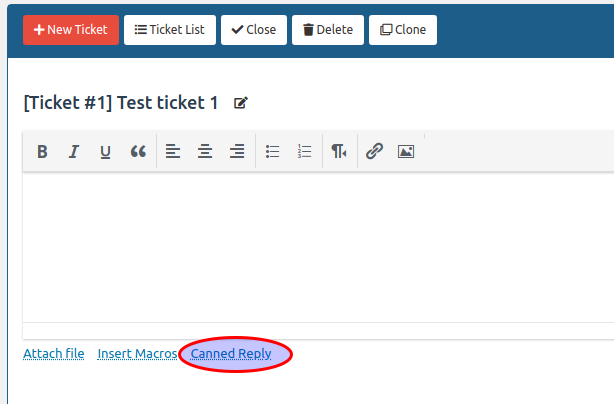
Application: While replying to a ticket, the agent clicks the Canned Reply link/icon above the text editor.
-
Selection: A popup appears where the agent can search by title or filter by category. Clicking the response automatically populates the editor.
- Categories: WordPress Plugins
- Tags: SupportCandy