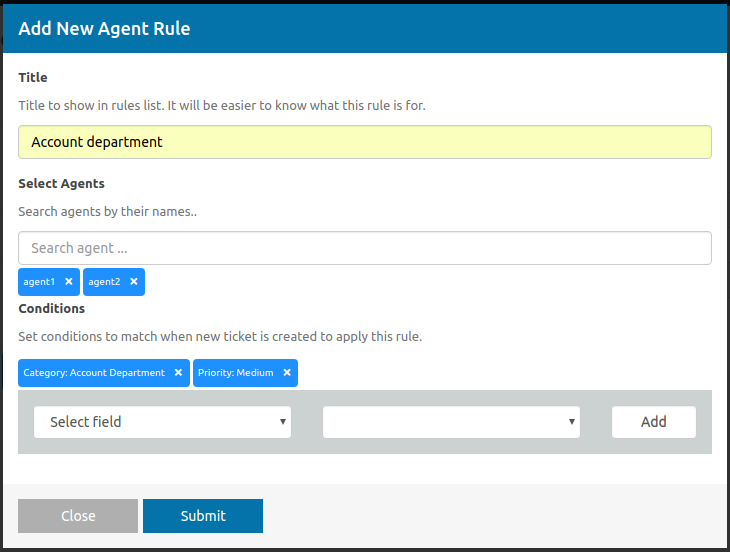

Tired of assigning a agent every time you create a website ticket? This is a solution to assign work order information to work orders. You can set up rules (conditions) to match when creating a new ticket, and if it matches, assign the agent to the ticket.
This is EXACTLY the same product as distributed by the developer. Sales Page
THIS ITEM IS ACTIVATED
Core Functionality
The extension works on a Condition → Action logic. When a ticket is created, the system evaluates it against your active rules and assigns agents accordingly.
-
Condition-Based Filtering: You can set rules based on any ticket property, including:
-
Ticket Category (e.g., Technical vs. Billing).
-
Priority (Urgent, Medium, Low).
-
Custom Fields (Text, Dropdown, Checkbox values).
-
Customer Identity (Specific email domains or user roles).
-
-
Logical Operators: Supports conditions like Equal to, Matches, Has word, and Compare as.
Assignment Logic & Distribution
Beyond simple routing, the plugin handles workload balancing through several “algorithms”:
| Method | How it Works |
| Minimum Workload | Assigns the ticket to the agent with the fewest open tickets. |
| Closest Working Hours | Assigns based on who is currently “on the clock” or nearest to starting their shift. |
| Round-Robin | Distributes tickets evenly in a rotating sequence among a set group of agents. |
| Skill-Based | Routes tickets to agents with specific expertise matched via categories or tags. |
Agent Group Integration
If you also use the AgentGroups add-on, the Assign Agent Rules extension gains extra depth:
-
Assign Group Only: The ticket goes to a team bucket; supervisors then manually delegate.
-
Assign Group + Member (Including Supervisors): Assigns to the group and picks one member (via workload/hours logic), including managers.
-
Assign Group + Member (Excluding Supervisors): Same as above, but protects managers from being assigned individual tickets.
Technical Requirements
-
Core Plugin: Requires the base SupportCandy (Free or Pro) plugin installed.
-
WordPress Version: Typically requires WP 4.0 or higher.
-
PHP Version: Compatible with PHP 7.4 through 8.2+.
-
License: Usually sold as an individual add-on or part of the “Full Bundle” on the official site.
- Categories: WordPress Plugins
- Tags: SupportCandy