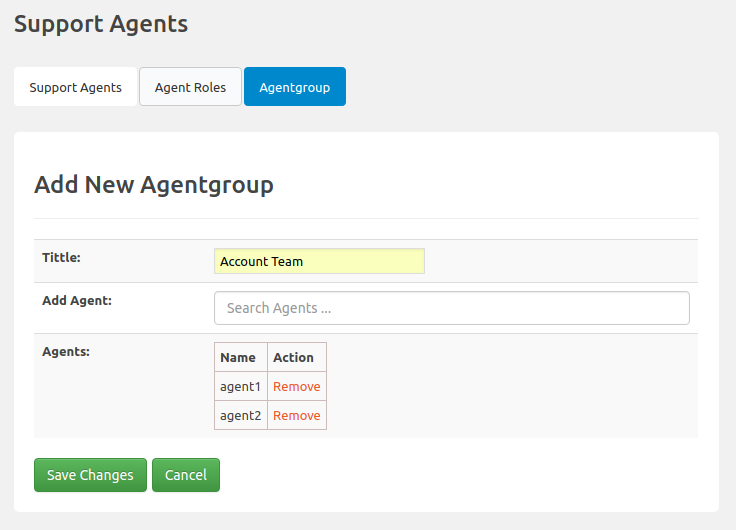

You can create agent groups, and you can assign tickets to agent groups, just like individual agents. Each agent in the group can manage the tickets assigned to the group. If you want to assign a ticket to a group and want any available agent in that group to be able to select the ticket, this add-on is for you.
This is EXACTLY the same product as distributed by the developer. Sales Page
THIS ITEM IS ACTIVATED
Core Functionality
-
Team Organization: Create unlimited groups (e.g., “Technical Support,” “Billing,” “Sales”) to categorize your agents.
-
Supervisor Roles: You can appoint one or more Supervisors for each group. Supervisors have elevated permissions within that group, such as the ability to see all tickets assigned to the group and delegate them to specific members.
-
Ticket Isolation: By default, tickets assigned to an Agentgroup are only visible to the group members once a supervisor assigns the ticket to them. This prevents “inbox noise” for agents who aren’t handling a specific case.
-
Flexible Assignment: An individual agent can be a member of multiple groups simultaneously, allowing for cross-departmental coverage.
Automation & Routing
When combined with the Assign Agent Rules add-on, Agentgroups become much more powerful:
-
Auto-Assignment: Automatically route tickets to a specific group based on the ticket category, priority, or custom fields.
-
Smart Distribution:
-
Assign to the group only (Supervisors then manually distribute).
-
Assign to the group and a specific member based on Workload (who has the fewest open tickets).
-
Assign to the group and a member based on Working Hours (who is currently online/available).
-
Notifications & Collaboration
-
Group Notifications: Set up email templates that trigger specifically for “Agentgroup Members” or “Agentgroup Supervisors.”
-
Internal Notes: Agents within a group can use private notes to collaborate on a ticket without the customer seeing the internal discussion.
-
Filtering: The ticket list includes filters to quickly view tickets assigned to a specific Agentgroup.
Technical Requirements
| Specification | Requirement |
| Base Plugin | SupportCandy (Core) must be installed and activated. |
| WordPress Version | Compatible with latest stable versions (6.x recommended). |
| PHP Version | PHP 7.4 or higher recommended for optimal performance. |
| License | Part of the “Standard,” “Professional,” or “Agency” bundles. |
- Categories: WordPress Plugins
- Tags: SupportCandy