
The SupportCandy Email Piping add-on adds the ability to directly import emails into your ticket system so that clients can create tickets by sending emails to your support staff, or reply to tickets by replying to email notifications without Log in to your website.
This is EXACTLY the same product as distributed by the developer. Sales Page
THIS ITEM IS ACTIVATED
The SupportCandy Email Piping extension is a premium add-on for the SupportCandy WordPress plugin. It allows your helpdesk to “read” an external email inbox and automatically convert incoming emails into support tickets or threaded replies.
Below are the detailed technical specifications and features for the extension:
1. Connection Methods (Authentication)
The extension supports three primary ways to connect your support email address to the ticketing system:
-
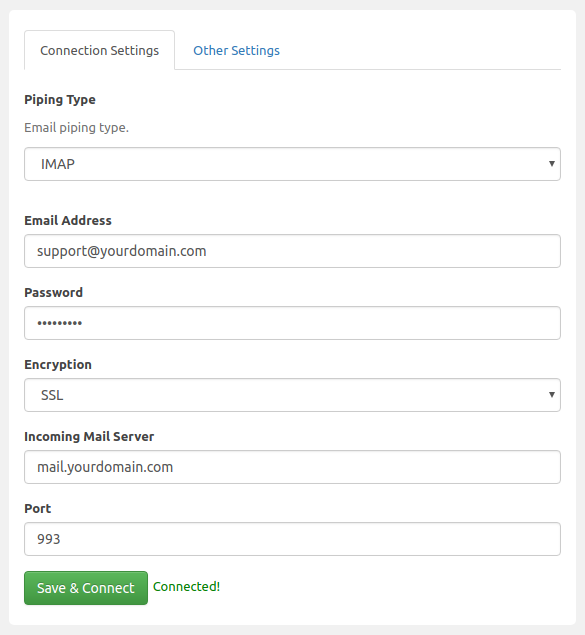
Basic IMAP: The standard protocol for most email providers (requires Host, Port, Username, and Password).
-
Gmail API: Uses OAuth2 authentication. This is the recommended (and often required) method for Google/Google Workspace accounts since they have deprecated “Basic Authentication.”
-
Microsoft Exchange API: Uses OAuth2/Graph API for Outlook/Office 365 accounts, ensuring compatibility with modern security standards.
2. Core Functional Features
-
Multi-Mailbox Support: While the plugin connects to one primary “piping” mailbox, you can handle multiple support addresses (e.g.,
sales@,billing@) by forwarding them to the main piped address. -
Smart Threading: The system automatically detects ticket IDs in the subject line to ensure replies are appended to the correct existing ticket rather than creating duplicates.
-
Attachment Handling: Supports both inbound and outbound attachments, allowing users and agents to exchange files directly via email.
-
HTML/Plain-Text Parsing: You can set a preference for which format to import. If the preferred format is missing, the system automatically falls back to the available version.
-
Import CC/BCC: Optionally add CC’d recipients on an email as “Additional Recipients” in the ticket so they stay in the loop.
3. Piping Rules & Automation
This is a powerful sub-feature that allows you to “triage” tickets as they arrive via email:
-
Conditions: Rules can be triggered based on the Sender’s Email, Forwarding Address, or Keywords (Has Word) in the subject or body.
-
Actions: If conditions are met, the system can automatically set:
-
Ticket Category (e.g., “Payments”).
-
Priority (e.g., “High” if “Urgent” is in the subject).
-
Assignee (Auto-assign to specific agents or departments).
-
Custom Fields: Auto-populate specific data into your custom support fields.
-
4. Security & Filtering
-
Access Control: Define if the system should pipe emails from “Anyone” (Guest tickets) or “Registered Users Only.”
-
Blacklisting: Block specific email addresses or domains from creating tickets.
-
Subject Filtering: Use exact matches, wildcards (e.g.,
*SPAM*), or Regular Expressions (/regex/i) to block certain subjects. -
Spam Filter: Includes a built-in check to block duplicate emails with the same subject and body received within a 5-minute window.
5. Technical Requirements
| Requirement | Specification |
| Parent Plugin | SupportCandy (Free or Pro version) |
| WordPress Version | Compatible with latest versions (usually 5.0+) |
| PHP Version | PHP 7.4 or higher recommended |
| Cron Job | Requires WordPress Cron or a System Cron (recommended) to fetch emails at intervals (e.g., every 5 minutes). |
| PHP Extensions | php-imap extension must be enabled on your server for the Basic IMAP method. |
- Categories: WordPress Plugins
- Tags: SupportCandy