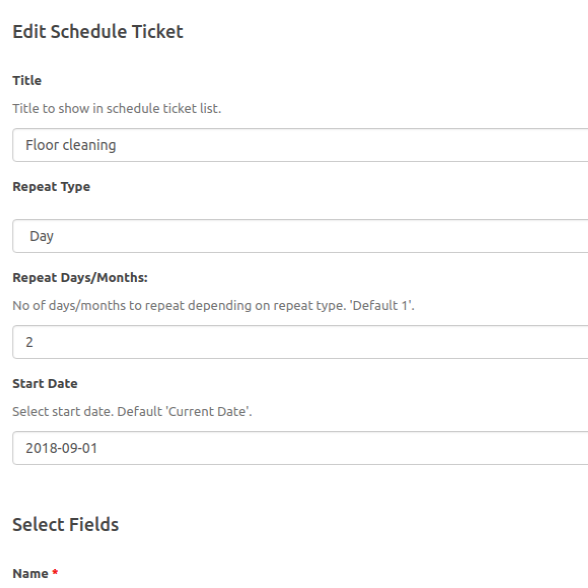

The SupportCandy Schedule Tickets add-on can automatically created every X days/months. You can create recurring tickets based on the requirements for tasks with custom ticket fields.
This is EXACTLY the same product as distributed by the developer. Sales Page
THIS ITEM IS ACTIVATED
Core Functionality
The primary purpose is to allow administrators to define a “template” for a ticket and set a schedule for when it should be automatically generated.
-
Automatic Creation: Tickets are created in the background without manual intervention.
-
Pre-filled Data: You can define the subject, description, category, priority, and assigned agent for the scheduled ticket.
-
Workflow Integration: Once a scheduled ticket is created, it follows your standard SupportCandy workflows (notifications, status changes, etc.).
Recurrence Options
The plugin offers highly granular scheduling options to cover almost any business use case:
-
Daily: Every $x$ days or every $x$ working days.
-
Weekly: Every $x$ weeks on specific days (e.g., every 2 weeks on Monday and Friday).
-
Monthly: * On a specific date (e.g., the 15th of every month).
-
On a relative day (e.g., the second Friday of every month).
-
-
Yearly: * On a specific date and month (e.g., January 1st every year).
-
On a relative day of a specific month (e.g., the last Monday of December).
-
Termination Rules
You can control when a recurring schedule should stop:
-
No End Date: The ticket will continue to be created indefinitely.
-
End After X Times: Stops after a specific number of tickets have been generated.
-
End Date: Stops creating tickets after a specific calendar date.
Technical Specifications & Requirements
| Feature | Specification |
| Plugin Requirement | Must have the SupportCandy base plugin installed. |
| License Type | Premium (usually included in “All Extensions” or “Professional/Agency” bundles). |
| PHP Compatibility | Compatible with PHP 8.1+ (as of current 2026 standards). |
| Data Storage | Self-hosted (data stays on your WordPress database). |
| Permissions | Administrators can create and manage schedules; tickets can be assigned to any active Agent. |
Common Use Cases
-
Server Maintenance: Schedule a ticket every Sunday at 2:00 AM for “Weekly Backup Verification.”
-
Client Check-ins: Auto-create a ticket every 3 months for “Quarterly Account Review.”
-
Compliance Audits: Schedule a ticket for “Monthly Security Log Review” on the first of every month.
- Categories: WordPress Plugins
- Tags: SupportCandy