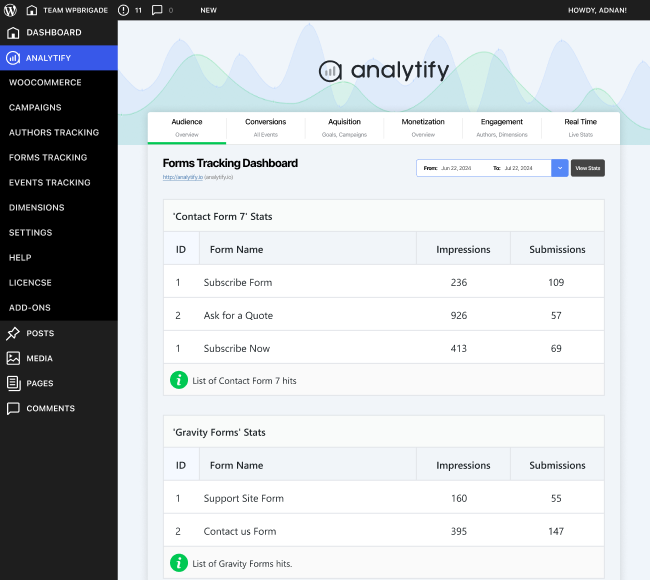

The Analytify Forms Tracking Add-on enables you to monitor every form interaction on your WordPress site without coding. Track submissions from popular form builders (e.g., Contact Form 7, Gravity Forms, WPForms, Ninja Forms) or custom forms, view conversion-rate reports in real time, and integrate seamlessly with your Google Analytics setup. Ideal for lead-generation sites, agencies and marketing teams, this add-on turns form activity into actionable insights—letting you optimize forms, improve performance and boost lead capture efficiently.
$4.99
Download 5,000+ Themes & Plugins for Only $15 Join Now
This is EXACTLY the same product as distributed by the developer. Sales Page
What is the Forms Tracking Add-on for Analytify?
Forms are critical conversion points on many websites—but tracking them properly often requires complex setup or custom code. The Forms Tracking Add-on for Analytify handles this automatically: once installed and enabled, it captures form impressions, submissions and conversion metrics across your site and feeds them into your analytics dashboard. No developer time, no workaround.
Key Features
- Supports multiple form plugins and custom forms, including major builders.
- Tracks both form impressions (views) and successful submissions, giving you conversion-rate insight.
- Real-time submission monitoring so you can see form activity as it happens.
- Dedicated dashboards and reports: show most active forms, submission volume, conversion trends.
- Customizable reporting: filter by form type, date range, user segment and export data as needed.
- Simple setup: one-click activation, select which forms to track and you’re done.
- Works with Google Analytics (including GA4) to centralize your form-conversion data in one place.
Typical Use Cases
- A lead-generation website monitors how many visitors view and submit each contact or quote-request form, then refines underperforming ones.
- An agency provides clients with a dashboard showing form submissions and conversion trends across campaigns without building custom reports.
- An e-commerce site uses registration or inquiry forms and wants to link those submissions to later purchases or follow-ups.
- A service-provider website uses custom forms for appointments or quotes and needs actionable insights into which forms draw the most leads and where drop-off happens.
Setup & Workflow
- Install and activate the Forms Tracking add-on alongside the core Analytify plugin.
- Navigate to the Forms Tracking settings, select which form-builders or custom forms you want to track.
- For custom forms, apply the predefined tracking class or configuration to ensure the plugin captures the submission event.
- View the Forms Tracking dashboard to monitor form impressions, submissions and conversion rates.
- Filter and segment reports to analyse specific forms, time-frames or user groups.
- Optimize forms based on insights: remove low-performing fields, improve layout, test variations, then monitor results.
Benefits
- Unlocks insight into how users interact with your forms—so you can enhance performance, increase conversion and reduce drop-off.
- Simplifies tracking by avoiding manual setup, custom code or complex analytics configurations.
- Works across multiple form types, so you’re covered for standard builders and custom implementations.
- Provides real-time data and dedicated reports so you stay informed and responsive.
- Helps drive data-driven improvements to form design, UX, and lead generation without relying on external tools or ad-hoc tracking.
- Categories: WordPress Plugins
- Tags: Analytify