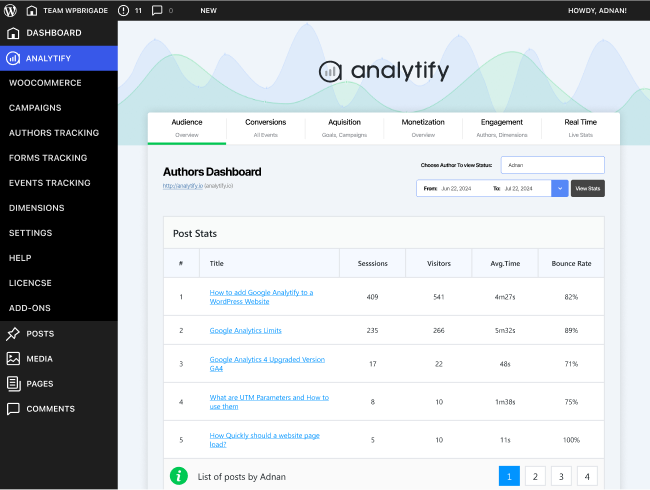

The Authors Tracking add-on for Analytify empowers multi-author WordPress sites to monitor individual contributor performance with precision. Track metrics such as pageviews, sessions, bounce rate and average engagement for each author and each post. Gain deeper insights into which authors drive traffic, engage audiences, and convert content into results—and then tailor your editorial strategy accordingly.
This is EXACTLY the same product as distributed by the developer. Sales Page
Note: This Product is Activated.
What is the Authors Tracking Add-on for Analytify?
When you have multiple authors publishing content on your WordPress website, not every post—or author—performs the same way. The Authors Tracking add-on adds author-specific analytics to your site, letting you monitor how each writer’s content contributes to overall traffic, engagement and conversions. This deeper visibility helps you understand performance at the author level, not just the site level.
Key Features
- Track each author’s pages/posts for metrics like total pageviews, sessions, bounce rate and average time on page.
- See performance right down to individual posts for each author—identify best-performing content and underperformers.
- Top-author reports let you compare contributors side-by-side and highlight which authors are delivering most value.
- Compatible with posts and custom post types, so you can include guest posts, custom content types or specialised topics.
- Works with author fields and custom dimensions to integrate author names and IDs into your analytics setup.
- Supports setting up dashboards with date-range filters, device or traffic-source filters—giving granular insights into author performance.
Typical Use Cases
- A publication ranking multiple freelance writers tracks which authors drive the most traffic and engagement, then assigns new topics strategically.
- A blog with internal and guest contributors compares performance to decide whom to commission more work.
- An organisation with subject-matter experts monitors content contribution from each expert author and tailors editing or training accordingly.
- A custom-type site (e.g., tutorials, case studies) views author analytics for those content types and adapts editorial focus or resource allocation.
Setup & Workflow
- Install and activate the add-on alongside the core Analytify plugin.
- Enable the authors-tracking feature and configure custom dimensions if needed (to capture author names/IDs in analytics).
- Assign appropriate user roles or authors to each post if they aren’t already.
- Navigate to the Authors-Analytics dashboard in WordPress to review author-level metrics, filter by date, device or source.
- Use the insights to refine who writes what topics, how often authors publish, or which content gets commissioned next.
- Periodically revisit the reports to track changes, observe improving or declining author performance metrics, and adjust strategy.
Benefits
- Provides clarity on individual author contributions rather than aggregate site metrics only.
- Helps you identify high-performing authors, enabling you to allocate topics, training or promotions accordingly.
- Allows you to spot authors whose content under-performs, then support, retrain or redefine their assignments.
- Supports growth and scalability of your content-team with data-backed performance tracking.
- Aligns editorial decisions with actual reader behavior and engagement—which can boost traffic, conversions and revenue.
- Categories: WordPress Plugins
- Tags: Analytify