
The WP Media Folder Gallery Addon brings image management functions to WordPress. In addition to the native features of the WP Media Folder plugin, you can also create image libraries from existing folders.
This is EXACTLY the same product as distributed by the developer. Sales Page
1. Gallery Themes & Display
The addon provides 7 professional themes that can be applied to any gallery with one click:
-
Masonry: A modern “brick-style” photo wall.
-
Portfolio: Displays images with titles and text descriptions.
-
Slider: A classic image carousel.
-
Flow Slide: A 3D-effect slider with text overlays on hover.
-
Square Grid: A uniform grid with hover effects.
-
Material Design: Inspired by Google’s design language, featuring clean shadows and styled titles.
-
Default/Custom Grid: Enhanced versions of the standard WordPress layout.
2. Technical Specifications
-
Requirements: Requires the core WP Media Folder plugin to be installed and active.
-
Editor Compatibility: Full native support for Gutenberg (Block Editor) with dedicated gallery blocks, as well as the Classic Editor.
-
Page Builder Integration: Deep integration with Elementor, DIVI, WPBakery, and Avada (Fusion Builder) via dedicated modules.
-
Performance: Ultra-lightweight codebase designed to maintain fast frontend loading speeds.
-
Mobile Responsiveness: All gallery themes are fully responsive and touch-optimized for mobile and tablets.
3. Key Management Features
-
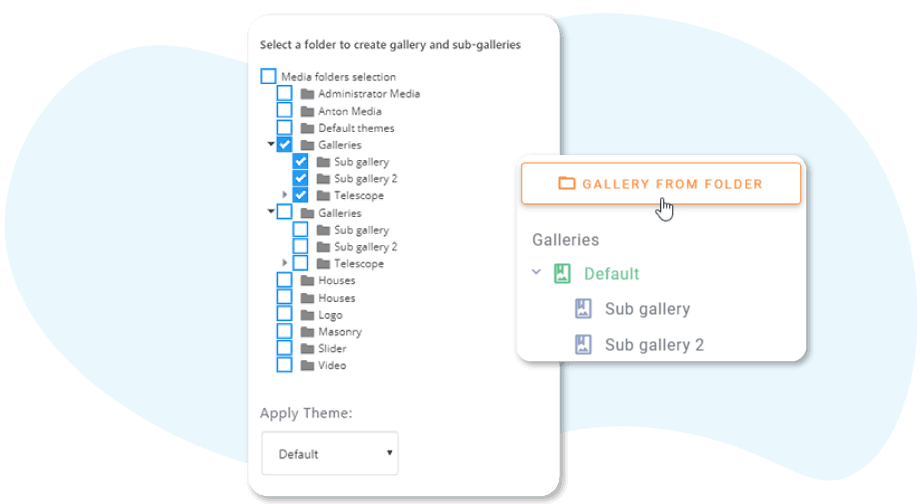
Galleries from Folders: Automatically create a gallery based on a media folder. Adding an image to the folder automatically updates the gallery on the frontend.
-
Multi-level Navigation: Supports gallery albums (nested galleries) with breadcrumb navigation.
-
Social Sharing: Built-in options to enable social sharing buttons for individual gallery images.
-
Video Support: Themes are versatile and can host remote videos (YouTube, Vimeo, Dailymotion) alongside local images.
-
SEO Optimization: Allows bulk editing of image Alt text, titles, and descriptions directly within the gallery interface.
-
Lightbox Options: Multiple lightbox styles with navigation arrows and transition effects.
4. Advanced Automation
-
Auto-Watermark: Can automatically apply watermarks to images within specific gallery folders.
-
Cloud Synchronization: If used with the Cloud Addon, it can pull gallery content directly from Google Drive, Dropbox, OneDrive, or Google Photos.
-
Image Links: Ability to add custom internal or external links to each image in the gallery.
- Categories: WordPress Plugins
- Tags: JoomUnited