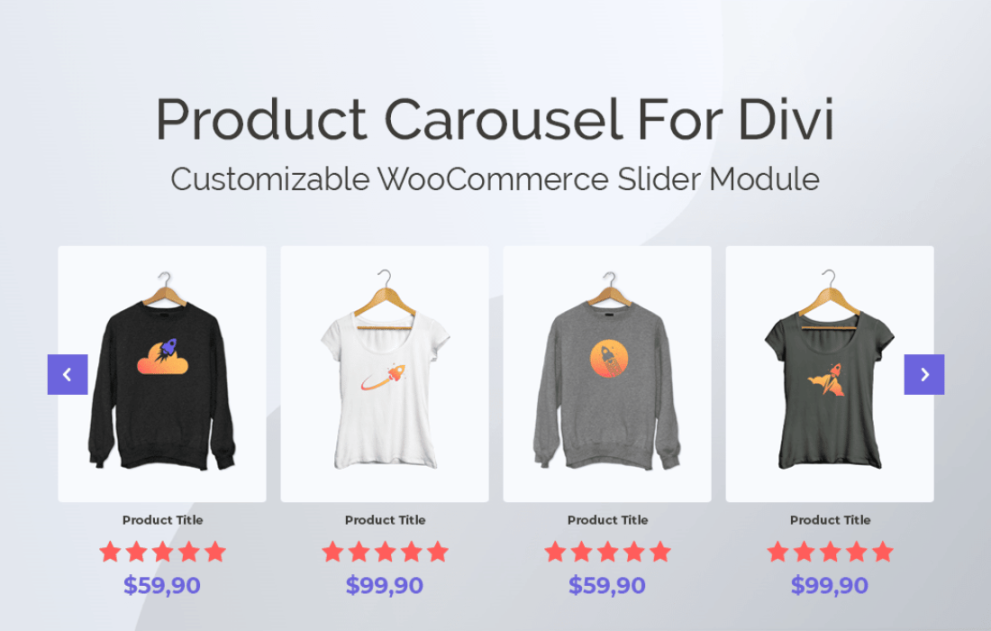

The Product Carousel for Divi and WooCommerce by WP Zone (formerly Aspen Grove Studios/Divi Space) is a specialized plugin designed to integrate advanced product slider functionality directly into the Divi Builder.
This is EXACTLY the same product as distributed by the developer. Sales Page
Note: This Product is Activated.
To run this plugin effectively, your environment should meet the following minimum specs:
WordPress: 4.9.8 or higher.
PHP: 7.2 or higher (7.4+ recommended).
MySQL/MariaDB: MySQL 5.6+ or MariaDB 10.0+.
Dependencies: Requires WooCommerce and either the Divi Theme, Extra Theme, or the Divi Builder Plugin.
Server Limits: A max_execution_time of 180 is recommended for smooth importing of demo data.
The plugin adds a custom “Woo Carousel” module to the Divi Builder with the following capabilities:
| Feature | Details |
| Carousel Layouts | Grid, Coverflow (3D), Centered, and Classic layouts. |
| Product Sorting | Sort by Date (newest/oldest), Price, Popularity, Rating, or Random. |
| Filtering | Filter products by Category, Tag, SKU, or manual selection. |
| Badges | Automatic “Sale,” “Featured,” and “New” badges with full styling control. |
| Interactivity | Includes “Quick View” and “Add to Cart” buttons directly on the carousel. |
| Performance | SEO-friendly markup and built-in Lazy Loading for images. |
The plugin offers over 100 configuration settings within the Divi Module:
Display Settings: Toggle visibility for product titles, prices, star ratings, and short descriptions.
Responsive Controls: Set specific numbers of visible items for Desktop (up to 6), Tablet, and Mobile.
Motion & Animation: * Autoplay (with speed control in milliseconds).
Infinite looping.
Pause on hover.
Navigation options: Arrows (custom icons), Pagination dots, or Scrollbar.
Design Tab: Full Divi-native styling for typography, button borders, image overlays, and box shadows.