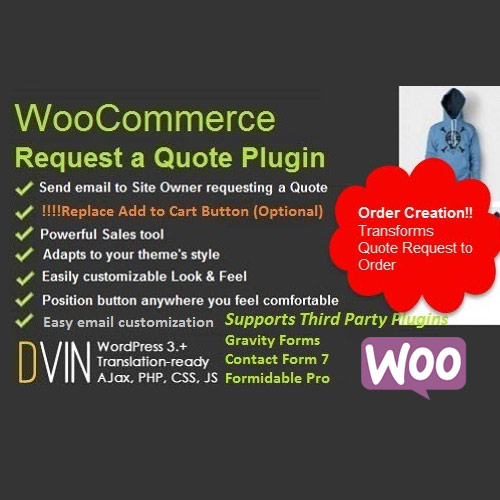

The WooCommerce Request a Quote plugin is a common solution for B2B or wholesale stores where prices aren’t fixed. While there are several versions (by developers like Addify, YITH, or WooCommerce official), they generally follow a standard set of technical and functional specifications.
This is EXACTLY the same product as distributed by the developer. Sales Page
Technical Specifications
-
WordPress Compatibility: Requires WordPress 6.2 or higher (tested up to 6.9+).
-
WooCommerce Compatibility: Supports WooCommerce 8.2.0 through 10.x.
-
PHP Version: Minimum PHP 7.4 (PHP 8.1+ recommended for performance).
-
Database: standard MySQL/MariaDB; stores quotes as a custom post type or a specialized “Quote Order” status.
-
Frontend Technologies: Built with JavaScript (AJAX for “Add to Quote” actions), CSS3 (Responsive), and HTML5.
-
Page Builder Support: Compatible with Elementor, Divi, and Gutenberg.
Core Features & Functionality
1. Button & Visibility Control
-
“Add to Quote” Button: Can replace the “Add to Cart” button or sit alongside it.
-
Rule-Based Display: Enable buttons for specific user roles (e.g., Wholesale only), specific categories, or individual products.
-
Price Hiding: Option to hide prices for guests or specific user roles, replacing them with custom text (e.g., “Login for price”).
-
Out of Stock Support: Automatically show the quote button only when an item is out of stock.
2. Quote Management (Admin Side)
-
Centralized Dashboard: View all quote requests in the backend with statuses like Pending, Under Review, Sent, and Accepted.
-
Price Negotiation: Admins can edit the quoted price, add discounts, or include tax/shipping fees before sending the offer back.
-
Convert to Order: One-click conversion of an accepted quote into a standard WooCommerce Order.
-
Expiry Dates: Set a “Valid Until” date for quotes to create urgency.
3. Submission & User Experience
-
Quote Basket: A “mini-cart” style sidebar or page where users can review items before submitting the final request.
-
Custom Form Fields: Built-in form builder to collect details (Project Name, Deadline, Company VAT, File Uploads).
-
Customer Dashboard: A dedicated tab in the “My Account” area for users to track, accept, or reject their quotes.
4. Communication & Exports
-
Email Notifications: Automated emails for quote submission, admin offers, and status updates.
-
PDF Generation: Ability to attach a professional PDF quotation to the email.
-
Multi-language: Compatible with WPML and Polylang for international B2B stores.
- Categories: WooCommerce, WordPress Plugins
- Tags: CodeCanyon