QuickCab is a powerful WordPress plugin for any business that provides transport as a service. It facilitates the price estimation, booking and payment of journeys.
Download 5,000+ Themes & Plugins for Only $15 Join Now

QuickCab is a powerful WordPress plugin for any business that provides transport as a service. It facilitates the price estimation, booking and payment of journeys.
This is EXACTLY the same product as distributed by the developer. Sales Page Live Demo
QuickCab is known for its highly flexible pricing logic, allowing you to move beyond simple flat rates:
Dynamic Calculation: Automatically calculates fares based on distance and time using Google Maps or OpenStreetMap.
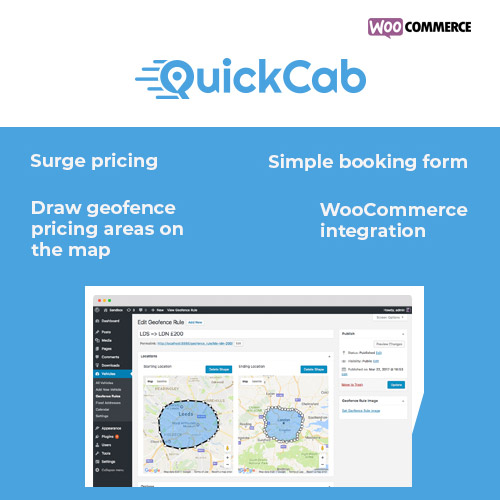
Geofence Pricing: You can draw custom zones on a map. If a trip starts in “Zone A” and ends in “Zone B,” you can set a specific fixed price or a price multiplier.
Surge Pricing: Set “Uber-style” multipliers (e.g., 1.5x) for peak hours, holidays, or specific date ranges.
Granular Charges: Charge based on the number of passengers, number of suitcases, or even a base “flag drop” fee.
Unlimited Vehicles: Add everything from economy sedans to luxury limousines.
Overbooking Protection: The “intelligent code” tracks your fleet capacity to ensure a vehicle isn’t booked twice for the same time slot.
Customizable Capacity: Set specific limits for passengers and luggage for each vehicle type.
Mobile-First Design: The booking form is fully responsive, ensuring customers can book easily from their phones.
Waypoints: Customers can add multiple stops (waypoints) along their route.
Live Fare Estimation: Users see an instant price quote as they type their pickup and drop-off locations.
Calendar View: A dedicated admin dashboard to visualize all upcoming bookings.
PDF Receipts: Automatically generates and emails PDF invoices or tickets to customers upon successful payment.
Multilingual Support: Comes with .pot files and supports 14+ languages (Arabic, German, French, etc.).
To run QuickCab effectively, your WordPress site needs:
WooCommerce: Must be installed and active (it handles the actual “checkout” and payment processing).
Map API Keys: * Google Maps API: Requires enabling Directions, Distance Matrix, Geocoding, and Places APIs. (Note: Google requires a billing account).
OpenStreetMap: A free alternative if you want to avoid Google’s API fees.
PHP Version: Ideally PHP 7.4 or 8.x for optimal performance.